
Fish Finder Setup for Fishing Boats

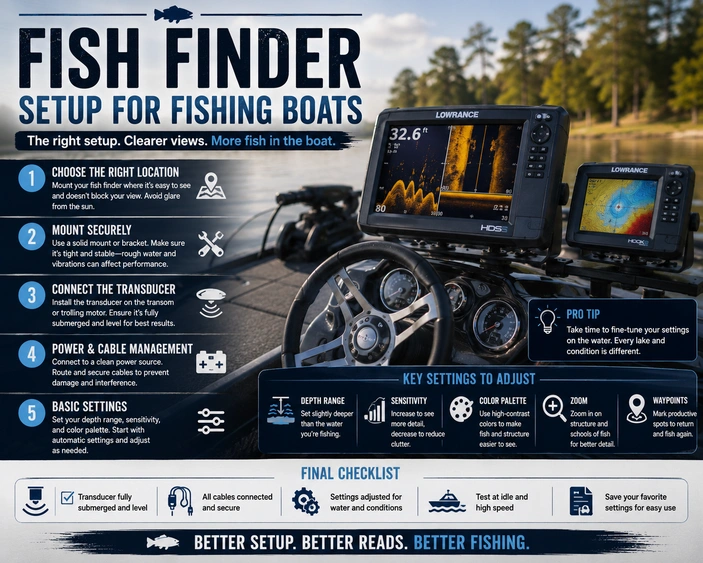
Fish Finder Setup for Fishing Boats
A fish finder can make your fishing boat more useful, more efficient, and easier to operate. The right electronics setup helps you read depth, identify structure, mark waypoints, watch bottom changes, follow contour lines, and make better decisions on the water.
But a fish finder is only as good as the setup behind it. Screen size, sonar type, transducer location, power supply, cable routing, networking, mapping, and mounting position all affect how well the system works.
Many shoppers start by asking, “Which fish finder should I buy?” A better first question is, “How should my fishing boat electronics be set up for the way I fish?”
For boaters in Virginia, Pennsylvania, Maryland, West Virginia, and nearby areas, MotoMember helps shoppers compare fishing boats, G3 boats, SunCatcher pontoons, marine accessories, service support, financing, trade-ins, and long-term ownership needs. MotoMember’s G3 boat guidance notes that shoppers can compare G3 availability, jon boats, aluminum fishing boats, SunCatcher pontoons, trolling motor options, accessories, financing, trade-ins, and service support through the dealership team.
Why Fish Finder Setup Matters
A fish finder is not just a screen on the dash. It is a full electronics system made up of a display, transducer, power wiring, mount, software, mapping, and sometimes a network of connected devices.
When everything is installed correctly, the unit is easier to read, the sonar image is cleaner, the GPS is more reliable, and the system is less frustrating to use. When the setup is rushed, anglers may deal with weak readings, screen clutter, interference, bad transducer angles, poor visibility, or power issues.
Humminbird explains that proper fish finder installation is essential for performance and that both the control head and transducer location matter. Its installation guidance recommends placing the control head where it is visible and accessible, while also noting that GPS-equipped units need a clear sky view unless an external sensor is used.
Before choosing electronics, consider the boat first. A jon boat, bass boat, deep-V aluminum fishing boat, center console, and fishing pontoon may all need different display locations, transducer mounts, wiring routes, and battery planning.
Start With Your Fishing Style
The best fish finder setup depends on how you fish most often.
A bass angler may want a bow display tied to a trolling motor transducer. A crappie angler may want a front unit with mapping and precise sonar. A catfish angler may prioritize depth, structure, and waypoint marking. A family fishing pontoon may need one easy-to-read helm unit with simple sonar and GPS mapping.
Before choosing a unit, ask yourself:
- Do I fish mostly from the bow, console, or stern?
- Do I use a trolling motor most of the day?
- Do I need mapping, sonar, or both?
- Do I fish shallow water, deep water, rivers, lakes, or reservoirs?
- Will I run one screen or multiple screens?
- Do I want the electronics integrated with a trolling motor?
- Where can the transducer be mounted cleanly?
Our team can help you compare these decisions before you commit to a boat or accessory setup.
Main Parts of a Fishing Boat Electronics Setup
A complete electronics setup usually includes more than the fish finder itself.
Display or Control Head
The display is the screen you look at while fishing or driving. It may show sonar, depth, water temperature, GPS position, mapping, waypoints, side imaging, down imaging, or split-screen views depending on the model.
Choose a display location based on visibility, reach, glare, and safety. A helm display should be easy to see while operating the boat. A bow display should be positioned for the angler controlling the trolling motor.
Transducer
The transducer sends and receives sonar signals. It is the part that reads what is below or around the boat.
Humminbird describes the transducer as the component that converts electrical energy into sound waves and interprets returned echoes for the display. Humminbird also notes that a transducer must be in direct contact with water and mounted where water flow is smooth.
Power Wiring
Fish finders need clean, reliable power. A weak connection, undersized wiring, poor ground, or shared circuit with noisy accessories can create screen problems and sonar interference.
Mounting Hardware
The display mount should be strong enough for trailering, rough water, and repeated use. Many anglers choose adjustable mounts so they can change the screen angle while standing or sitting.
Mapping and Software
Many modern fish finders include GPS mapping features or accept mapping cards. Software updates may also improve performance or compatibility, so check the manufacturer’s current instructions for your exact unit.
Choosing the Right Display Location
Display location should match how the boat is used.
At the helm, the display should be easy to read while running at safe speeds. It should not block forward visibility, interfere with steering, or make controls harder to reach.
At the bow, the display should be visible from the casting position. If you use a foot-control trolling motor, make sure the screen angle works while you are standing naturally. Do not mount the unit where rods, trolling motor cables, or storage lids constantly hit it.
On smaller jon boats, a compact display may work best near the rear seat, side console, or removable mount. On a fishing pontoon, a helm-mounted unit may be the cleanest setup, while more advanced anglers may also want a bow unit near dedicated fishing seats.
Transducer Mounting Options
The transducer location has a major effect on sonar quality.
Common mounting options include transom mount, trolling motor mount, in-hull mount, thru-hull mount, and portable mount. Humminbird’s mounting guide explains that different boat types and hull materials create different transducer mounting needs.
Transom-Mount Transducers
A transom-mount transducer is mounted at the rear of the boat. This is one of the most common setups for fishing boats.
Garmin’s transom-mount installation instructions state that the transducer should be mounted close to the center of the boat when possible and should avoid strakes, fittings, water intake or discharge ports, and other areas that create air bubbles or turbulent water. Garmin also says the transducer should not be mounted in the propeller path on single-drive boats.
This setup works well for many aluminum fishing boats, jon boats, utility boats, and pontoons when installed correctly.
Trolling Motor Transducers
A trolling motor-mounted transducer is popular with anglers who fish from the bow. It lets the sonar view follow the front of the boat, which can be useful when casting, jigging, or holding position over structure.
Humminbird notes that trolling motor mounting is ideal for anglers who want sonar coverage from the bow, with the transducer mounted to the trolling motor shaft or motor housing depending on compatibility.
This can be especially useful when paired with a bow display and a trolling motor setup designed for serious fishing.
In-Hull and Thru-Hull Options
Some boats may use in-hull or thru-hull transducers, but these require careful matching to the hull and sonar type. Humminbird notes that in-hull mounting is suitable for fiberglass hulls only and works only with 2D sonar transducers, not Side Imaging or Down Imaging models.
For most dealership shoppers comparing aluminum fishing boats and pontoons, transom or trolling motor mounting is more common. Always check the specific electronics manufacturer’s installation instructions before choosing.
Avoiding Sonar Interference
Sonar interference can make a good fish finder look bad.
Garmin’s transducer placement guide identifies several common interference sources, including electromagnetic interference from electronics, motors, and radar; turbulence from hull features such as steps, strakes, and ribs; and acoustic interference from another transducer, machinery, wind, waves, and rain.
This is why transducer location and cable routing matter so much. A transducer mounted in disturbed water may lose bottom readings. A transducer cable routed next to power wires may create noise. Two transducers mounted too closely may interfere with each other.
Garmin’s transom-mount installation instructions also advise avoiding cable routing close to electrical wires or other electrical interference sources.
For anglers, this means the cleanest installation is usually planned before holes are drilled. The right location should balance sonar performance, trailer clearance, cable protection, and access for service.
Power Setup for Fish Finders
Fish finders need stable power to perform well. Electronics problems are often blamed on the unit, but many issues start with wiring, battery condition, voltage drop, loose terminals, or poor connections.
A good electronics power setup should include:
- Correct wire size for the run
- Clean battery connections
- Proper fuse or circuit protection
- Secure cable routing
- Protection from sharp edges
- Separation from noisy power sources when possible
- A battery system that supports the boat’s full electrical load
If your fishing boat has multiple displays, live sonar, a trolling motor, pumps, lights, and accessories, power planning becomes even more important. Do not assume the original wiring is ideal for added electronics.
One Screen or Multiple Screens?
A single-screen setup is simple and effective for many boaters. It works well for small fishing boats, casual anglers, and family boats where one helm unit provides depth, sonar, and GPS mapping.
A two-screen setup is common for anglers who fish from both the console and bow. The helm unit helps while running, idling, and locating structure. The bow unit helps while casting, jigging, or controlling the trolling motor.
A more advanced setup may include multiple displays, networked units, live sonar, mapping cards, heading sensors, and trolling motor integration. That can be powerful, but it also adds cost, wiring complexity, setup time, and a learning curve.
Before going big, consider how much information you will actually use. A clean, well-installed simple setup is often better than a complicated setup that is hard to operate.
Matching Electronics to Boat Type
Different fishing boats need different electronics layouts.
Jon Boats
Jon boats often benefit from simple, durable setups. A compact fish finder, transom transducer, and clean battery wiring may be enough for pond, river, shallow-water, and utility fishing.
For more serious fishing, a bow-mounted display and trolling motor transducer may make sense. MotoMember’s G3 jon boat guidance recommends shoppers compare electronics space, trolling motor options, livewell needs, rod storage, and seating before choosing a model.
Aluminum Fishing Boats
Aluminum fishing boats may support more advanced electronics. A helm display, bow display, transom transducer, trolling motor transducer, and mapping setup can all be useful depending on the model and fishing style.
Before choosing, look at console space, bow deck space, battery compartments, wiring access, and where rods and passengers will be during a normal day.
Bass-Style Fishing Boats
Bass-style layouts often benefit from bow electronics because the angler spends so much time on the front deck. A console unit is useful for navigation, mapping, and scanning while idling. A bow unit supports casting, trolling motor control, and close-range fishing.
Fishing Pontoons
Fishing pontoons need electronics installed around seating, gates, fencing, and helm layout. A helm display may be enough for many families. Dedicated anglers may want a bow display near the fishing seats.
Think carefully about cable routing, transducer placement, and whether the boat will be used mostly for relaxed fishing, cruising, or both.
Mapping, GPS, and Waypoints
Sonar helps you see what is below the boat. GPS and mapping help you understand where you are.
A good mapping setup can help you mark brush piles, ledges, docks, channels, depth changes, launch ramps, and productive fishing spots. This can be especially helpful on larger lakes, reservoirs, and unfamiliar water.
If you fish in VA, PA, MD, and nearby areas, think about the water you visit most often. Reservoir anglers may value contour mapping. River anglers may care more about depth, current seams, and safe routes. Family boaters may want simple navigation and saved locations.
Always confirm map compatibility before buying a unit or card. Mapping features can vary by brand, model, region, and subscription or card type.
Electronics and Trolling Motor Integration
Some fish finder systems can integrate with compatible trolling motors. Depending on the electronics and motor, this may allow features such as shared waypoints, route following, heading functions, or control from the display.
The key word is compatible. Do not assume every fish finder works with every trolling motor. Brand, model, software, cable type, adapter, and network setup can all matter.
Lowrance describes its marine electronics lineup as including fishfinders, chartplotters, radar, and sonar products, which is a reminder that modern marine electronics can range from simple depth displays to full navigation and sonar systems.
Before buying electronics, ask whether your current or planned trolling motor can connect to the unit you are considering.
Clean Installation Checklist
Before installing a fish finder, walk through the full setup.
Ask these questions:
- Can I see the screen clearly from the operating position?
- Can I reach the controls safely?
- Will the screen block visibility or storage access?
- Can the transducer sit in clean water flow?
- Will the transducer clear the trailer bunks, rollers, and ramps?
- Are cables protected from rubbing, pinching, and heat?
- Is the power source clean and reliable?
- Is there proper circuit protection?
- Can the unit be updated or removed when needed?
- Will the setup still work when the boat is loaded with rods, tackle, coolers, and passengers?
Garmin’s support guidance for transducer installation states that general information is not a complete guide and that owners should read the installation instructions for the specific transducer being installed.
That is dealership-style advice worth following. The best installation is specific to the boat, the electronics, and the way the owner fishes.
MotoMember Expert Tip
Before choosing a fish finder, stand in the boat and picture a real fishing day.
Where are you when you need the screen most? Are you idling from the console, casting from the bow, watching rods from the stern, or helping family members fish from a pontoon? Can you see the screen without leaning, twisting, or stepping over gear?
Many shoppers compare screen size and sonar features first. In the showroom, our team often starts with layout, battery access, transducer placement, trolling motor plans, and serviceability. A great fish finder should fit the boat as naturally as the seats, storage, and controls.
Large selection. Straightforward shopping. Real powersports and marine expertise.
Call to Action
Ready to upgrade your fishing boat electronics or compare boats that are easier to rig?
Contact MotoMember or browse current inventory to compare fishing boats, G3 aluminum boats, SunCatcher pontoons, marine accessories, service support, financing options, and trade-in opportunities. Current availability, equipment, pricing, and model details can change, so contact the MotoMember team before planning around one exact boat or electronics package.
Our team can help you think through display location, transducer mounting, battery setup, wiring, trolling motor integration, accessories, and long-term service support.
Your fishing boat setup starts at MotoMember.
Stop dreaming. Start boating.
Conclusion
The best fish finder setup for a fishing boat is not always the biggest screen or the most advanced sonar. It is the setup that works cleanly with your boat, your fishing style, your battery system, and your normal day on the water.
Start with display location, then plan the transducer. Keep wiring clean, power reliable, cables protected, and interference sources in mind. Decide whether you need one unit, two units, mapping, networking, or trolling motor integration based on how you actually fish.
For anglers across Virginia, Pennsylvania, Maryland, West Virginia, and nearby areas, MotoMember can help compare boats, accessories, electronics-friendly layouts, financing, trade-ins, and service support before and after the sale.
FAQ
Where should I mount a fish finder on a fishing boat?
Mount the display where it is easy to see, easy to reach, and safe to use. Helm units should not block visibility or controls. Bow units should be visible from your normal casting or trolling motor position.
What is the best place to mount a transducer?
The best transducer location depends on the boat and transducer type. For many fishing boats, a transom mount or trolling motor mount is common. The transducer should be in clean water flow and away from turbulence, prop wash, and interference sources.
Do I need a separate battery for fish finder electronics?
Not always, but clean and reliable power is important. Boats with multiple displays, live sonar, trolling motors, pumps, and accessories may need more careful battery and wiring planning. Ask the MotoMember team or a qualified marine technician before adding major electronics.
Is one fish finder enough for a fishing boat?
One fish finder is enough for many casual anglers and smaller boats. Serious anglers who fish from both the console and bow may prefer two displays, with one used while running and one used while casting or controlling the trolling motor.
Can MotoMember help with fishing boat electronics setup?
Yes. MotoMember can help shoppers compare fishing boats, marine accessories, electronics-friendly layouts, service support, financing, and trade-ins. Current inventory and accessory options can vary, so contact the team for current guidance.